Guide
How to Search the Tea App by Name (No Account Needed)

Men can't search the Tea app by name, because Tea is made for women and press reports say it checks a selfie or ID at sign-up. Tea App Checker lets a man search the Tea posts we can see by first name, city and age, free and with no account, and most checks take about 10 seconds. Seeing each possible match is free; you pay once only for a post you choose to open.
Run a free check
First name, city and age, or a photo. Most checks take about 10 seconds. Nobody on Tea is told.
First name only works best.
Free to search · pay only for the posts you open
Loading the search…
Can you search the Tea app by name?
Not inside Tea itself. Tea is a women-only app, and press reports say it checks a selfie or ID when someone signs up. A man can't open the app and look up his own name.
You can still run a name search from the outside. Tea App Checker checks your details against the Tea posts we can see. It isn't part of Tea and isn't affiliated with Tea. If you want to know what Tea looks like from the outside, read The Tea App Website: What It Is and What Men Can See.
How does a Tea name search work?
You give three things: your first name, a city and your age. Those are matched against the Tea posts we can see.
Why those three? They are what a Tea post usually shows about a man. A typical post reads like "Jordan, 33" with a city and a photo. Last names are rare. So the search looks for posts that fit your first name, city and age together.
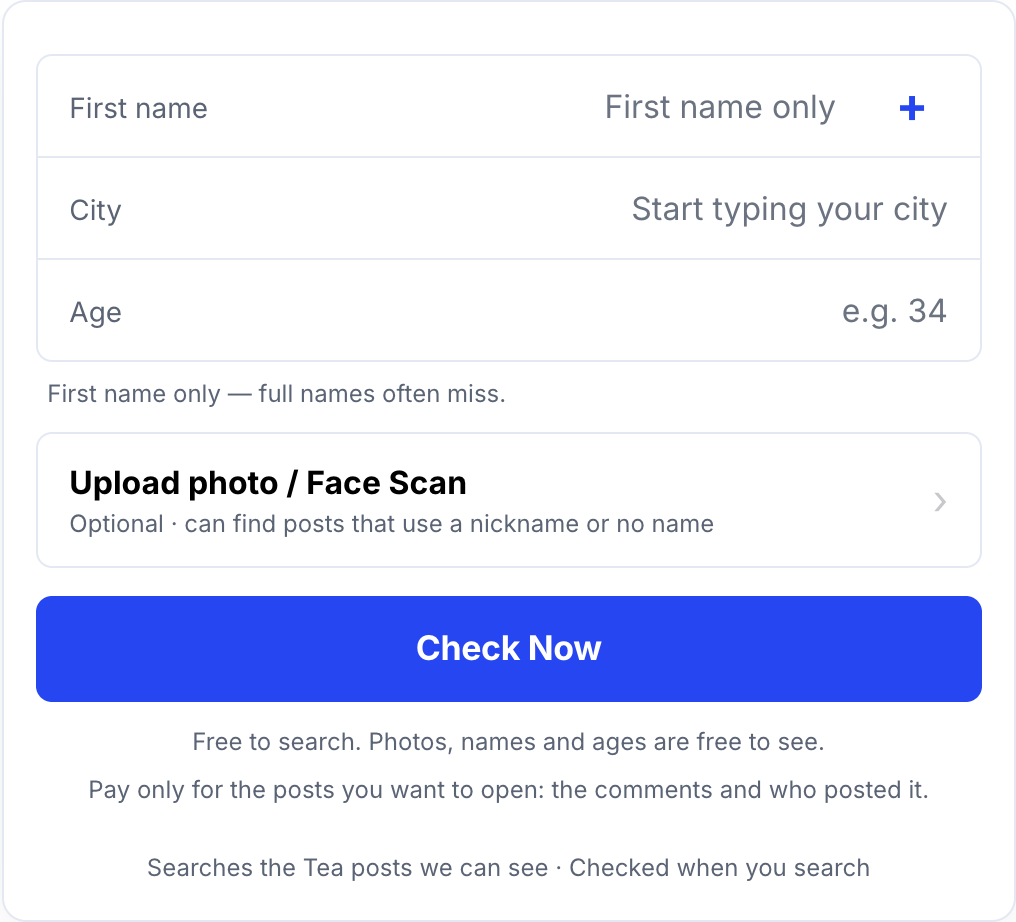
Searching is free. Each possible match shows its photo, first name, age, city, the date it went up, and how many comments and flags it has, also free. To read a post, you pay once for that one post. The price is on the button before you pay, and payment goes through Stripe with Apple Pay, Google Pay or card.
Key facts
- Tea App Checker searches by first name, city and age, or by photo.
- A Tea App Checker search needs no account and most checks take about 10 seconds.
- Tea App Checker shows each possible match's photo, first name, age, city, date and comment and flag counts for free.
- Tea App Checker charges once per post, only for a post you choose to open.
- Nobody on Tea is told when a man searches on Tea App Checker.
- Tea App Checker is not affiliated with Tea.
- A clean Tea App Checker result isn't proof you were never posted.
How should I type my name so I don't miss a post?
Type your name the way a woman you dated would write it, not the way it looks on your license.
Use the first name she knew you by
If you go by Mike, search Mike, not Michael. If your dating profile says "Alex", use Alex. Not sure? Run one search for each version.
Leave out your last name
Posts almost never include it. First name only works best.
Pick the city where you date
Posts list a city or area. If you live in one place and date in another, search the place where you date. In a big metro area, try the main city first, then your suburb.
Use your real age, then try one year off
Posters write the age they know or guess. If you just had a birthday, or you look older or younger than you are, run a second search one year off.
Check more than one city if you need to
Moved this year? Travel for work? Date in two cities? Check each one. Each search is free.
What if my name is common?
A common name like James or Chris will often bring up more than one possible match. That is normal. It doesn't mean you were posted. It means other men with your name were.
To narrow it down:
- Look at the photo first. It is the quickest way to rule a post in or out.
- Check the city and age. If both are off, it is probably not you.
- Check the date. Were you dating in that city back then?
- Add your photo. A Tea App Checker photo search uses our own face match to look for posts that show a similar face.
Should I search by name or by photo?
Use a name search first, and add a photo if your name is common or you think a post used a nickname.
A name search works best when a post uses your real first name. Its weak spot is common names.
A photo search works best for nicknames, posts with no name, and common names. Its weak spot is a blurry or side-on photo, so use a clear, front-facing one.

Both are free. A photo is only used if you choose to add one, and you're asked to agree first. Only add a photo of yourself. The Biometric Notice explains how photos are handled. Read the Privacy Policy for details, or use Delete my data to ask for your data to be removed.
What can a name search not tell you?
A name search shows possible matches, not proof. Know the limits before you act:
- A match is a possible match. It isn't proof the post is about you.
- No match isn't proof you were never posted. It means nothing turned up in the Tea posts we can see today. New posts go up all the time, so check again later.
- It won't give you anyone's full legal name. An unlocked post can also show the Tea account behind it. How Tea App Checker works explains what that includes.
If something goes wrong with a payment, see our refund policy.
How we know this
This guide is based on how Tea App Checker's own search form and results work, and on what Tea posts about men usually show. To learn more, read How Tea App Checker Works (and What It Can't Do) or Am I on the Tea App? How to Check for Free.
Ready? Run a free check on Tea App Checker.
Common questions
Can I search the Tea app by last name?
You can try, but Tea posts rarely show a last name. On Tea App Checker, a search by first name, city and age works much better.
Does the person who posted me find out I searched?
No. A Tea App Checker search isn't posted anywhere, and nobody on Tea gets a notice that you looked.
Do I need a Tea account to search the Tea app by name?
No. Tea App Checker needs no account of any kind. You enter a first name, city and age, and most checks take about 10 seconds.
What if I was posted under a nickname?
Search the nickname too, or add a photo. A Tea App Checker photo search uses our own face match, so it can find posts that don't use your name at all.
Is a name search on Tea App Checker free?
Yes. Searching is free, and so is each possible match's photo, first name, age, city, date and comment and flag counts. You pay once only for a post you choose to open.